
How I’d Start a Digital Product Business From Scratch Today
Ready to build a digital product business but have absolutely no idea where to start, what to make, or how to get anyone to actually buy it?
If you’re anything like me, you’ve probably spent way too long watching other people talk about their passive income wins online and thinking okay but HOW, though. Like, where does someone who is genuinely starting from zero even begin? What do you make, where do you sell it, how do you get people to find it, and why does everyone make it sound so easy when it clearly is not that simple?
I’ve been there. I spent six weeks consuming content about digital products before I made a single thing. Six weeks! Colour-coded Notion docs, saved YouTube videos I never finished, entire evenings down the research rabbit hole. And at the end of all that? Still no product. Still no shop. Just a lot of notes and a vague sense that I was definitely doing something wrong.
So this post is the version I wish someone had handed me at the beginning. The actual step-by-step process in the order you actually do it, written in plain language for someone who is genuinely starting from scratch today.
By the time you finish reading, you will know exactly what type of product to make, how to find a niche that has real buyers in it, where to sell, how to write a listing that converts, and what to do in your first 30 days to start building momentum.

Why Digital Products Are Still One of the Best Businesses to Start Right Now
Let’s deal with this first because I know what you’re thinking.
Isn’t the market saturated?
Isn’t everyone selling digital products now?
And the answer is yes, more people are selling them, and also no, the market is absolutely not saturated if you are being specific about who you are selling to and what problem you are solving for them.
Here is the thing about digital products that makes them different from almost any other business model available to a regular person with a laptop and a few hours a week. You make the thing once. Then it can sell over and over without you having to do anything extra for each individual sale. No inventory, no shipping, no manufacturing costs, no customer service calls at 11pm. Someone pays, they get a download link, and the transaction is complete whether you are at your desk or on a walk or genuinely just living your life.
That does not mean it is a push-button money machine. You still have to make something good. You still have to put it somewhere people can find it and write a listing that makes the right person feel like this was made for me. There is real work involved upfront. But the work you do in month one can keep paying you in month six, month twelve, month twenty-four, and that is a very different relationship with your time than trading hours for money in a traditional job or freelance setup.
The reason so many people fail at this is not because the market is too crowded. It is because they make generic products for everyone, list them without any thought for how their buyer actually searches, wait two weeks for sales that don’t come, and then decide it does not work. It works. It just requires specificity, patience in the first 90 days, and a willingness to look at your data and adjust instead of giving up.
The people who build real income from digital products are not the ones who had everything figured out before they started. They are the ones who started before they had everything figured out and kept going anyway.
Not sure what type of digital product is right for you? Read this first: What to Sell as a Digital Product (And How to Know Which One Fits You)
What a Digital Product Business Actually Is (And the Biggest Mistake Beginners Make)
A digital product business is exactly what it sounds like: you create digital files that solve a problem or fulfill a need, and you sell those files to people who need them. The buyer pays, downloads the file, and uses it. You keep the money. The file still exists for the next person to buy.
The most beginner-friendly types of digital products are:
- Templates and Canva designs that people edit for their own use
- Printables like planners, trackers, checklists, and worksheets
- eBooks, PDF guides, and educational resources
Simple on the surface. And it genuinely can be simple. But the biggest mistake almost every beginner makes is trying to sell to everyone at once by making something generic, something like 100 Social Media Templates or The Ultimate Planner Bundle, with no specific person in mind, no specific problem being solved, and no reason for a buyer to choose their version over the thousands of other versions already out there.
The shift that changes everything is going from I am making templates to I am making weekly budget tracker printables for people in their 20s who are scared to look at their bank account. One of those is a product category. The other is a product with a buyer inside it. And buyers who feel like a product was made specifically for them convert at a completely different rate than buyers who are browsing a generic listing and feeling vaguely uncertain.
Before you make anything, write down one sentence that describes your product, who it is for, and what problem it solves. If you cannot write that sentence yet, that is your actual starting point, not the design, not the shop setup, not the branding. The sentence comes first.
The Profitable Digital Product Playbook walks you through exactly how to go from idea to a product that is ready to list, including how to pick a niche, validate demand, and price your product so people actually buy it.
Get the Profitable Digital Product Playbook
How to Actually Start: The Step-by-Step Process
Step 1: Find a Niche That Has Real Buyers In It
This is the step everyone skips, spends too long on, or does incorrectly, and it is the foundation everything else is built on, so let’s get it right.
A niche is not a topic. It is a specific type of person with a specific problem who is actively looking for a solution and willing to pay for it. The difference between planners as a niche and weekly meal planning templates for busy parents who are trying to stop doing the 5pm panic stare into the fridge is the difference between being invisible and being findable. One of those is a category, the other is a buyer with a Tuesday evening problem you can actually solve.
The fastest way to find your niche is to start with what you already know, even a little bit. Are you someone who manages a tight budget? Someone who runs a small service-based business? Someone who has been through a specific life season, a new job, a move, a baby, a career change, a side hustle that took off? Whatever you know, there is someone who needs it in a useful, downloadable format, and they are already on Etsy searching for it.
After you have an idea, do a quick sanity check. Go to Etsy and search for versions of what you are thinking about. If people are already selling it, that is genuinely good news because it means people are already buying it. You are not looking for a completely untouched gap. You are looking for a space where you can show up with something more specific, better designed, or aimed at a buyer the existing products are ignoring.
Quick niche validation: what to check on Etsy
Go to Etsy, search your idea, and look at three things: are there products in this category getting reviews (which means sales), what search terms does Etsy autocomplete when you type your idea (which tells you how buyers actually phrase their searches), and are the top listings specific or generic. If the top results are all generic bundles and you can come in with something more targeted, that is your opening.
Real example: Sarah was a virtual assistant who kept seeing other VAs struggle with onboarding new clients professionally. She made a client onboarding packet template in Canva, specific to virtual assistants, with the intake forms, welcome letter, and service agreement cover page they actually needed. Not a generic business template pack. A system for one specific professional moment. It sold consistently from month one because the buyer could see themselves in the listing title immediately.

Some niches that are working well right now:
Small business owners and service providers:
- Client onboarding and welcome packet templates
- Business proposal and contract cover page templates
- Invoice and quote templates
- Staff onboarding and training document templates
- Meeting agenda and SOPs
Coaches and course creators:
- Client welcome packet templates
- Digital workbook and journal templates
- Lead magnet and freebie templates
- Course slide deck templates
- Intake form and coaching agreement templates
People planning life events:
- Bridal shower game printables
- Baby shower activity templates
- Wedding day timeline templates for coordinators
- Rehearsal dinner invitation templates
- Milestone birthday party printables
People managing personal finances and productivity:
- Weekly and monthly budget tracker printables
- Debt payoff tracker templates
- Meal planning and grocery list printables
- Habit tracker and goal setting worksheets
- Daily and weekly planner inserts
The Profitable Digital Product Playbook includes a full niche selection framework with a demand validation process so you can confirm there are buyers before you spend time making anything.

Step 2: Make One Product and Actually Finish It
Once you have your niche and your buyer, your only job is to make one finished product. Not a shop, not a collection, not a launch plan. One product that solves one problem for one type of person, finished well enough that you would be genuinely proud to sell it.
If you are making Canva templates, open Canva on a free account and start by browsing what similar products look like on Etsy so you understand the format and quality level. Then make your own version, keeping the layout clean and easy to edit, with clear instructions for how the buyer customizes it. The most common mistake here is overcomplicating the design, too many fonts, too many colors, too many elements that make it harder rather than easier for the buyer to make it their own.
If you are making a PDF guide or eBook, open Google Docs or Canva’s document feature and start with the content before you touch the design. Get everything you want to say down first, then go back and make it look professional. Trying to design and write at the same time is a great way to spend four hours and end up with two pages and a headache.
What does a finished product actually look like?
A good first product is somewhere between five and twenty pages for a PDF or guide, or between ten and thirty individual template designs for a template pack, something specific enough to solve a real problem, polished enough that the buyer feels good about what they paid, and simple enough that you can actually complete it without burning out before you list it. Done and listed beats perfect and still in draft every single time.
Real example: Marcus was a personal trainer who kept sending his new clients the same information over text messages every time someone signed up. He turned that information into a client welcome pack template in Canva, with a welcome letter, workout schedule layout, goal-tracking sheet, and FAQ page. It took him one weekend to make. He listed it on Etsy and sold it to other personal trainers who had the same onboarding problem he used to have. His product solved something he had already lived through, which meant he knew exactly what the buyer needed without having to guess.
[Example image placeholder]
If you want to skip the blank page problem entirely and work from something that is already structured and ready to customize, the Create Bundle gives you 450-plus editable Canva templates across high-demand categories, the kind of foundation you can open, adapt to your specific niche, and have a finished sellable product from in a single session rather than a month of starting over.
Coaches and consultants:
- Client resource and workbook templates
- Welcome packet and onboarding templates
- Lead magnet and freebie PDF templates
- Course and workshop slide deck templates
- Goal setting and reflection worksheet templates
Digital product sellers:
- Editable planner and journal templates
- Habit and goal tracker printable templates
- Budget and finance tracker templates
- Content planning and social media calendar templates
- Checklist and guide layout templates
Freelancers and service providers:
- Client proposal and quote templates
- Contract cover page and agreement templates
- Invoice and payment receipt templates
- Portfolio and case study document templates
- Client feedback and review request templates
Bloggers and content creators:
- Media kit and pitch deck templates
- Content calendar and batch planning templates
- Brand style guide templates
- Email newsletter templates
- Social media graphic and carousel templates

Step 3: List It Somewhere and Write a Description That Actually Converts
You have a finished product. Now it needs a home where people can find it and buy it, and you need a listing that makes the right person feel like this was made for them.
For most beginners, Etsy is the starting point and the reason is straightforward. Etsy already has millions of buyers on it, already in purchase mode, already searching for the kind of thing you are selling. You do not need an existing audience to make sales on Etsy. You need to show up in the right search results with a listing that speaks clearly to the person searching. Setting up an Etsy shop takes about an hour and you just need an email address, a shop name, a banner image, and at least one listing to go live.
Once you are getting some traction, adding your own website through a platform like Payhip or Stan Store gives you more control and a higher profit margin since you are not paying Etsy fees on every sale. Most people end up doing both, but starting on Etsy while you figure out what sells and what your buyer actually responds to is the smartest first move for someone without an established audience.
Writing a listing that converts
Your title is the most important part of your listing because it is what Etsy’s search algorithm uses to match you with buyers, and it is the first thing a buyer sees. Write it the way your buyer would search for it, not the way you would describe what you made. Canva Template Editable Instant Download tells me nothing useful. Weekly Meal Planner Printable for Busy Families, Canva Template, Editable, Instant Download tells me exactly who it is for, exactly what it is, and exactly what I get when I buy it. Your buyer should be able to see themselves in the title within the first few words.
Your description should open with the situation your buyer is in right now, not a list of what the product includes. Start with the problem, then describe what life looks like after they use your product, and then go into the specifics of what is included. End with clear instructions for how they access and use it after purchase, because a confused buyer is a buyer who asks for a refund.
Real example: Priya was selling a budget tracker printable and her original listing title was Budget Tracker Printable PDF Instant Download.
She changed it to Monthly Budget Tracker Printable for Beginners, Easy to Use Bill Payment and Savings Tracker, Instant Download. Her views went up 60% in the following two weeks because she was now showing up for the searches her actual buyer was doing, not just the generic category.

Your photos do more heavy lifting than you might expect. Use Canva’s free mockup feature to show your product displayed on a laptop screen, a phone, or printed on a desk. Make it look like a real, premium thing someone would be excited to receive, because the visual is what stops the scroll before the buyer even reads your title.
Coaches and consultants:
- Use lifestyle mockups showing the product in a professional setting
- Show multiple pages or screens to demonstrate the full value
- Include a photo of what the editable version looks like inside Canva
- Add a slide showing exactly what is included in the download
- Use clean, branded mockups that match the aesthetic of your niche
Digital product sellers and Etsy beginners:
- Start with at least five photos per listing
- Lead with your strongest, most scroll-stopping image
- Show the product in use, not just floating on a white background
- Include a graphic that lists what is included
- Show a before and after if your product helps solve a visual problem

Bonus Steps: Building the Foundation for Consistent Sales
Bonus Step 1: Build a Lead Magnet From Day One
A lead magnet is a free resource you give away in exchange for someone’s email address, and building one at the same time as your first paid product is one of the highest-leverage things you can do as a beginner.
Here is why this matters more than most people realize. Your Etsy shop can change its algorithm. Instagram can tank your reach overnight. But your email list is yours, and you can talk to the people on it any time you want, with no platform taking a cut of your reach. Every person who downloads your free checklist or guide is someone you can tell about your paid products, your new launches, your sales, and your updates, directly and without competing with anyone else for their attention.
Your lead magnet does not need to be complicated or time-consuming to make. A one-page checklist related to your niche is enough. A short guide that solves one small part of the bigger problem your paid product addresses is enough. A single free template that gives people a taste of what your paid templates are like is enough. The goal is to give away something genuinely useful to the right person and build a relationship from there.
Here is how to execute it in a practical way. Make the free resource in Canva, convert it to a PDF, and upload it to a platform like Mailerlite or ConvertKit where people can sign up with their email address and receive the download automatically. Then link to your lead magnet signup in your Etsy shop bio, your social media profiles, and anywhere else your buyer might find you. Every person who signs up is a future buyer you can reach without relying on any platform’s algorithm.
Coaches and consultants:
- A one-page checklist of questions to ask before a discovery call
- A free mini workbook with three reflection prompts from your signature framework
- A resource guide for your specific niche (tools, apps, books)
- A short quiz that leads to a product recommendation
- A free email sequence that teaches something related to your paid product
Digital product sellers:
- A free sample template from your paid pack
- A one-page guide to the problem your product solves
- A free checklist version of your paid tracker
- A resource list related to your niche
- A short tutorial on how to use Canva for your specific type of product
Service providers and freelancers:
- A free contract clause checklist
- A client red flags guide
- A pricing calculator or worksheet
- A onboarding checklist for new clients
- A portfolio template or proposal outline
The Complete Lead Magnet Creation Bundle gives you everything you need to build a lead magnet that actually moves people toward buying, not just downloading and forgetting. And if an eBook format makes more sense for your niche, the Brand-Ready Starter eBook Bundle comes with five fully written, brandable eBooks you can customize and start using right away.
Bonus Step 2: Show Up on One Platform Consistently
You have a product listed and a lead magnet ready. Now you need people to find both of them, and the way you do that as a beginner without an ad budget is by showing up consistently somewhere your buyer already spends time.
The most common beginner mistake here is trying to be everywhere at once. They start an Instagram, a TikTok, a Pinterest, a YouTube channel, and a blog in the same week, post twice on Instagram, never touch the others, feel overwhelmed, and then tell themselves that social media does not work. Social media works when you pick one platform, show up regularly, and give your specific buyer something useful before you ever ask them to buy anything.
Pick the platform where your buyer actually hangs out. If your buyer is a small business owner or professional, LinkedIn and Pinterest are both strong. If your buyer is a busy parent or someone trying to get more organized at home, Pinterest is probably your best starting point because people go there specifically to find solutions and save things they intend to buy later. If your buyer is a coach, course creator, or someone building an online presence, Instagram and TikTok are where that community is most active.
The goal of your content is not to sell. It is to be useful and build trust. Share tips about the problem your product solves. Talk about the thing you know from experience. Show behind-the-scenes of what you are making and why. When someone has been learning something valuable from you for free, buying your product becomes a natural next step rather than a cold pitch they have to talk themselves into.
Specific pricing and timing note: research consistently shows that digital products priced between $7 and $27 convert at the highest rate for first-time buyers, especially from cold social media traffic. Once someone has bought from you once, they are significantly more likely to buy again at a higher price point. So start lower to build trust and reviews, then introduce higher-priced products to your existing buyers.
Coaches and course creators:
- Share one tip from your expertise three to four times a week
- Post behind-the-scenes of your client work (with permission)
- Share a common mistake your buyer makes and how to fix it
- Show before and after transformations related to your niche
- Give away a piece of your paid content for free occasionally
Etsy and digital product sellers:
- Show your design process in a short video or carousel
- Share what your product looks like in use
- Post tips related to the problem your product solves
- Share buyer wins or reviews as social proof
- Create content around the search terms your buyer uses
Bloggers and content creators:
- Share your best performing blog post content in short form
- Turn your email content into social posts
- Post your lead magnet and link in bio to build your list
- Create educational content that naturally leads to your product
- Use Pinterest to drive long-term traffic to your blog and Etsy listings
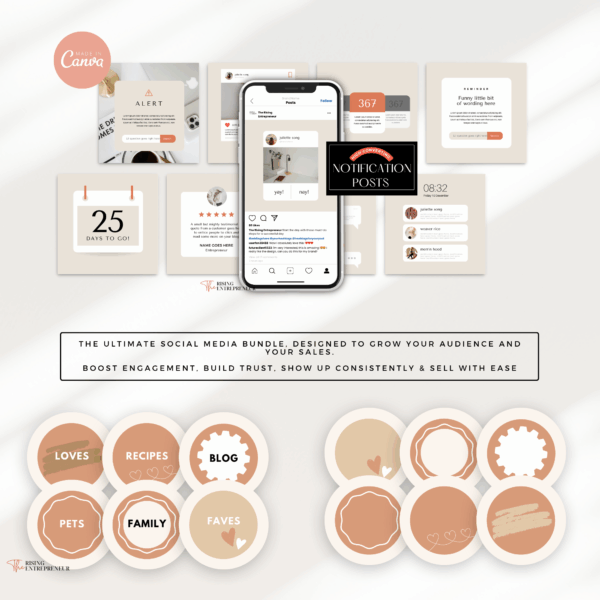
The Social Media Signature Bundle gives you 650-plus done-for-you templates across platforms so you are never starting from a blank screen, and the 100 Pastel Instagram Templates are a solid starting point if Instagram is where your buyer lives.
Get the Social Media Signature Bundle
Start Small, Start Today, and Keep Going
Here is the honest version of how this goes. Month one is mostly learning, you will build your product, set up your listing, figure out how the platform works, and probably make a small number of sales or none at all, and that is completely normal and does not mean you are doing anything wrong. Month two is about adjusting based on what you learned. Month three is usually when things start to feel like they are clicking.
The people who build real income from digital products are almost always the ones who stuck it out through the first 90 days when nothing felt like it was working yet.
You do not need a perfect brand, a huge following, or a flawless product to start. You need one specific product for one specific person, listed somewhere they can find it, with a description that makes them feel like it was made for them. That is the whole starting point. Everything else gets built from there.
If you want to move faster and have something ready to list this week rather than next month, check out Digital Product Mode, which gives you the templates, the messaging, and the system to go from idea to published product in 48 hours. And if you want the full blueprint for picking, building, and selling your first digital product, the Profitable Digital Product Playbook covers the whole process step by step.
Browse everything in the Rising Entrepreneur shop and find what fits where you are right now.
Now go make the thing. You have everything you need to start.